
Unity 食用文档(WaypointPath & Bezier 移动) 源码在最下方
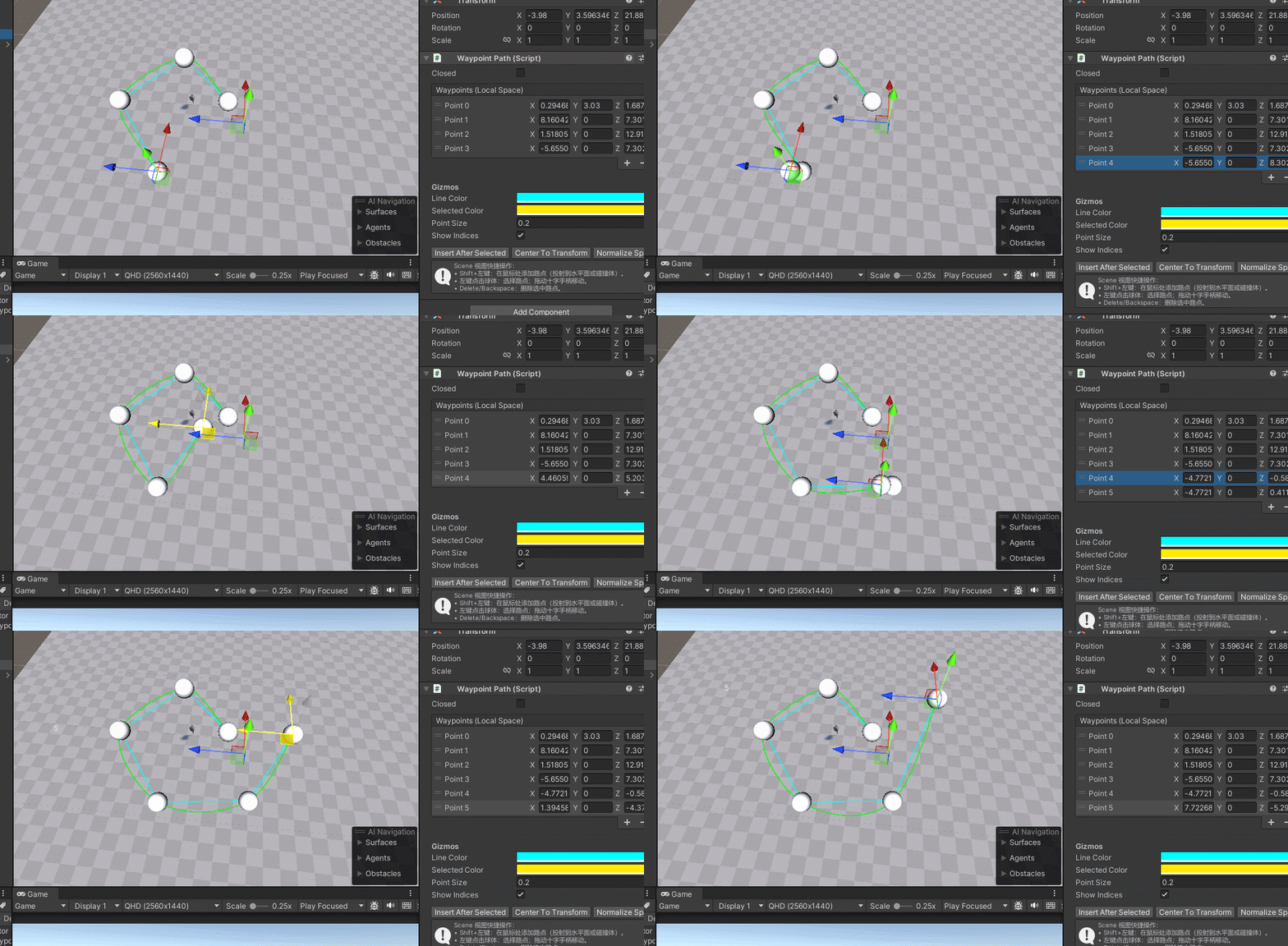
1. 简介
本系统实现了一个可视化路点编辑器,支持:
- 在 Scene 视图中添加、删除、拖动路点
- 路点数据存储在 List<Vector3> 中
- 运行时对象沿路点移动
- 平滑贝塞尔曲线移动
- 移动时自动旋转以跟随方向
适合用于:
- NPC 巡逻
- 车辆行驶
- 相机轨迹
2. 核心组件
2.1 WaypointPath.cs
- 作用:存储路点数据,并在 Scene 中可视化
- 字段
| 字段 | 类型 | 说明 |
|---|---|---|
m_Points | List<Vector3> | 路点列表(本地空间坐标) |
m_Closed | bool | 是否闭合路径 |
m_LineColor | Color | Gizmos 线颜色 |
m_SelectedColor | Color | 当前选中点颜色 |
m_PointSize | float | 路点球体大小 |
m_ShowIndices | bool | 显示索引标签 |
m_SelectedIndex | int | 当前选中路点(编辑器用) |
- 功能 在 Scene 中显示路点球体 通过 Inspector 或 Scene 操作增删点 支持闭合路径显示
- 示例 Gizmos 代码(编辑器显示点与索引):
private void OnDrawGizmos() { Gizmos.matrix = transform.localToWorldMatrix; for (int i = 0; i < m_Points.Count; i++) { Gizmos.color = (i == m_SelectedIndex) ? m_SelectedColor : m_LineColor; Gizmos.DrawSphere(m_Points[i], m_PointSize); } }
2.2 WaypointPathEditor.cs
- 作用:自定义 Inspector 和 Scene 交互
- 功能 ReorderableList 显示路点 Inspector 上支持: 添加 / 删除 / 插入路点 闭合路径设置 曲线平移 / 归中 / 等间距重采样(可选) Scene 视图操作: Shift + 左键:添加路点 点击球体:选中路点 拖动手柄:移动路点 Delete / Backspace:删除选中点
2.3 WaypointMoverBezier.cs
- 作用:运行时沿路点移动,并平滑旋转跟随方向
- 字段
| 字段 | 类型 | 说明 |
|---|---|---|
m_Path | WaypointPath | 路点引用 |
m_Speed | float | 移动速度 |
m_Loop | bool | 循环播放 |
m_PingPong | bool | 来回播放 |
m_CurrentIndex | int | 当前起始点索引 |
m_Direction | int | 来回模式方向 |
m_T | float | 曲线进度 [0,1] |
- 移动方式 使用 Catmull-Rom 样条插值点 m_T 记录曲线段进度 到达下一个点后切换索引
- 旋转方式 计算切线方向: Vector3 dir = (CatmullRom(P0, P1, P2, P3, t + 0.01f) - pos).normalized; transform.rotation = Quaternion.LookRotation(dir, Vector3.up);
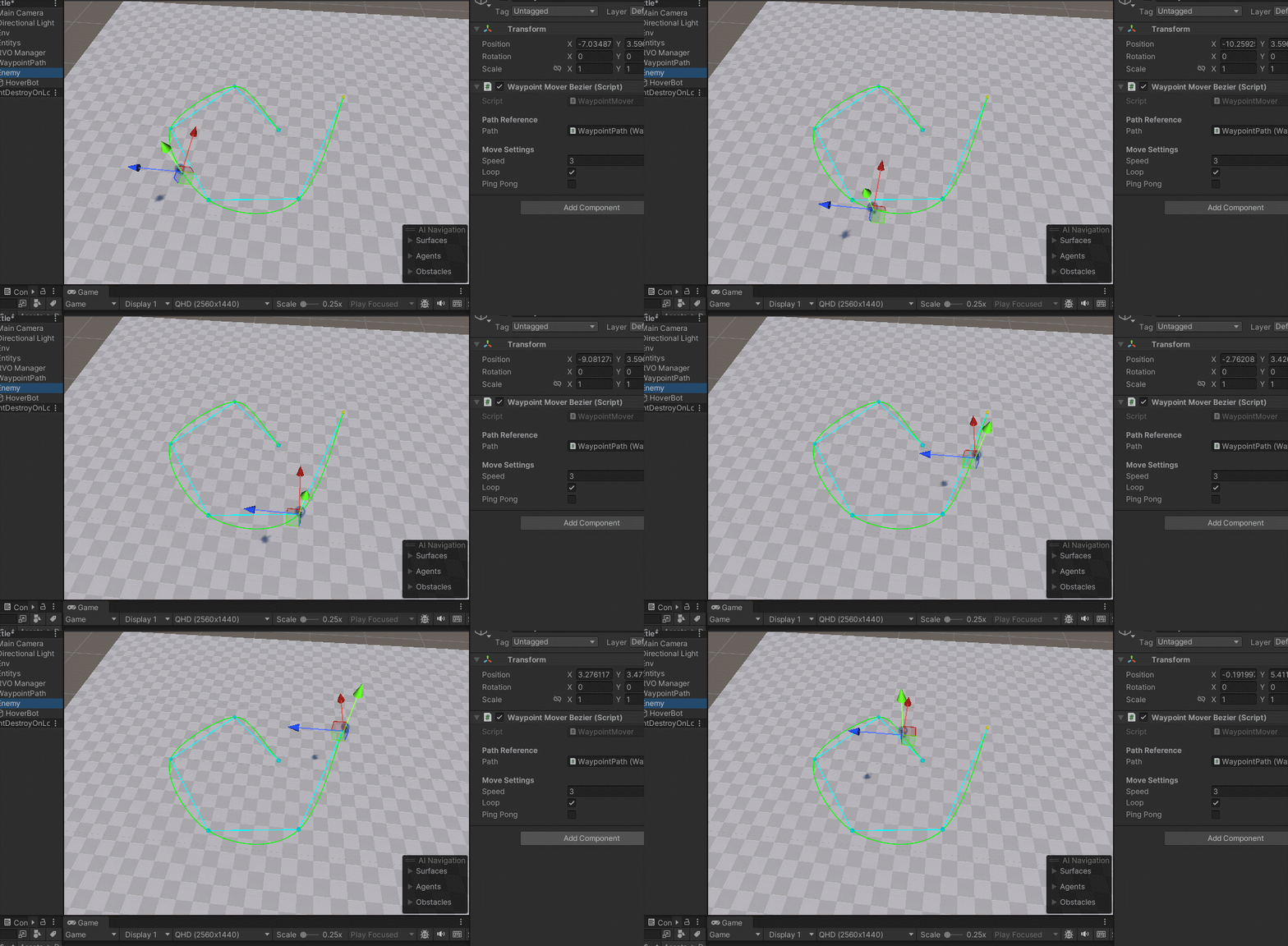
- Scene 视图可视化 绘制 Catmull-Rom 样条曲线 当前移动对象 → 下一个目标点线段
3. 使用方法
3.1 路点编辑
- 创建空对象,挂上 WaypointPath。
- 在 Inspector 添加几个路点,或在 Scene: Shift + 左键点击地面添加 左键点击球体选择,拖动调整 Delete 删除选中点
- 可选: 勾选 Closed 让路径闭合 调整 m_LineColor / m_SelectedColor / m_PointSize
3.2 运行时移动
- 找一个对象(Cube 或 NPC),挂上 WaypointMoverBezier。
- 拖入 WaypointPath 引用。
- 设置参数: Speed:移动速度 Loop:循环 PingPong:来回
- 运行游戏即可看到: 对象沿曲线路径移动 转弯自然 Scene 视图可看到曲线与目标点线段
4. 扩展建议
- 匀速移动:当前 Catmull-Rom 样条移动会在曲线长短不均时出现速度差,可用长度表采样实现等距移动
- 多对象共享路径:可让多个对象同时使用同一路点数据
- 动画与事件:在移动过程中触发事件或播放动画,例如巡逻动作或特效
- UI 显示路径进度:可用 m_T 或索引计算百分比
5. 关键技术点
- Scene 可视化 Gizmos + Handles + ReorderableList
- 平滑曲线 Catmull-Rom 样条,自动生成控制点
- 旋转跟随 切线方向 → Quaternion.LookRotation
- 编辑器操作 Shift+点击添加,拖动调整,Delete 删除
- 数据存储 List<Vector3> 本地坐标,Inspector / 运行时共用
文件一:WaypointPath.cs(放在任意非 Editor 目录)
using System.Collections.Generic;
using UnityEngine;

[ExecuteAlways]
public class WaypointPath : MonoBehaviour
{
    [Header( "Path Data" )]
    public List<Vector3> m_Points = new List<Vector3>( );   // 本地空间点(相对物体)
    public bool m_Closed;                                   // 是否闭合

    [Header( "Gizmos" )]
    public Color m_LineColor = Color.cyan;
    public Color m_SelectedColor = Color.yellow;
    public float m_PointSize = 0.2f;
    public bool m_ShowIndices = true;

    // 运行时/编辑器状态
    [HideInInspector] public int m_SelectedIndex = -1;

    // ── 偏好要求的 Get/Set ────────────────────────────────────────────
    public List<Vector3> GetPoints( ) { return m_Points; }
    public void SetPoints( List<Vector3> points ) { m_Points = points; }
    public bool GetClosed( ) { return m_Closed; }
    public void SetClosed( bool closed ) { m_Closed = closed; }
    public float GetPointSize( ) { return m_PointSize; }
    public void SetPointSize( float size ) { m_PointSize = size; }

    private void OnDrawGizmos( )
    {
        if ( m_Points == null || m_Points.Count == 0 ) return;

        Gizmos.matrix = transform.localToWorldMatrix;
        Gizmos.color = m_LineColor;

        // 画线
        for ( int i = 0; i < m_Points.Count - 1; i++ )
        {
            Gizmos.DrawLine( m_Points[ i ], m_Points[ i + 1 ] );
        }
        if ( m_Closed && m_Points.Count > 2 )
        {
            Gizmos.DrawLine( m_Points[ m_Points.Count - 1 ], m_Points[ 0 ] );
        }

        // 画点
        for ( int i = 0; i < m_Points.Count; i++ )
        {
            Gizmos.color = ( i == m_SelectedIndex ) ? m_SelectedColor : m_LineColor;
            Gizmos.DrawSphere( m_Points[ i ], m_PointSize );
        }
    }

#if UNITY_EDITOR
    private void OnDrawGizmosSelected( )
    {
        if ( !m_ShowIndices || m_Points == null ) return;
        UnityEditor.Handles.matrix = transform.localToWorldMatrix;

        for ( int i = 0; i < m_Points.Count; i++ )
        {
            var world = transform.TransformPoint( m_Points[ i ] );
            UnityEditor.Handles.Label( world, $" {i}" );
        }
    }
#endif
}
文件二:WaypointPathEditor.cs(放到 Editor/ 目录)
using UnityEngine;
using UnityEditor;
using UnityEditorInternal;

[CustomEditor( typeof( WaypointPath ) )]
public class WaypointPathEditor : Editor
{
    private WaypointPath m_Path;
    private SerializedProperty m_PointsProp;
    private SerializedProperty m_ClosedProp;
    private SerializedProperty m_LineColorProp;
    private SerializedProperty m_SelectedColorProp;
    private SerializedProperty m_PointSizeProp;
    private SerializedProperty m_ShowIndicesProp;

    private ReorderableList m_List;
    private const float k_HandlePickSize = 0.08f;

    private void OnEnable( )
    {
        m_Path = ( WaypointPath ) target;
        m_PointsProp = serializedObject.FindProperty( "m_Points" );
        m_ClosedProp = serializedObject.FindProperty( "m_Closed" );
        m_LineColorProp = serializedObject.FindProperty( "m_LineColor" );
        m_SelectedColorProp = serializedObject.FindProperty( "m_SelectedColor" );
        m_PointSizeProp = serializedObject.FindProperty( "m_PointSize" );
        m_ShowIndicesProp = serializedObject.FindProperty( "m_ShowIndices" );

        m_List = new ReorderableList( serializedObject, m_PointsProp, true, true, true, true );
        m_List.drawHeaderCallback = rect => GUI.Label( rect, "Waypoints (Local Space)" );
        m_List.drawElementCallback = ( rect, index, active, focused ) =>
        {
            var el = m_PointsProp.GetArrayElementAtIndex( index );
            rect.y += 2;
            EditorGUI.PropertyField(
                new Rect( rect.x, rect.y, rect.width, EditorGUIUtility.singleLineHeight ),
                el, new GUIContent( $"Point {index}" )
            );
        };
        m_List.onSelectCallback = list =>
        {
            m_Path.m_SelectedIndex = list.index;
            SceneView.RepaintAll( );
        };
        m_List.onAddCallback = list =>
        {
            Undo.RecordObject( m_Path, "Add Waypoint" );
            Vector3 addPos = Vector3.zero;
            if ( m_PointsProp.arraySize > 0 )
                addPos = m_PointsProp.GetArrayElementAtIndex( m_PointsProp.arraySize - 1 ).vector3Value + Vector3.forward;
            m_PointsProp.InsertArrayElementAtIndex( m_PointsProp.arraySize );
            m_PointsProp.GetArrayElementAtIndex( m_PointsProp.arraySize - 1 ).vector3Value = addPos;
            serializedObject.ApplyModifiedProperties( );
            m_Path.m_SelectedIndex = m_PointsProp.arraySize - 1;
            EditorUtility.SetDirty( m_Path );
        };
        m_List.onRemoveCallback = list =>
        {
            if ( list.index < 0 || list.index >= m_PointsProp.arraySize ) return;
            Undo.RecordObject( m_Path, "Remove Waypoint" );
            m_PointsProp.DeleteArrayElementAtIndex( list.index );
            serializedObject.ApplyModifiedProperties( );
            m_Path.m_SelectedIndex = Mathf.Clamp( list.index - 1, -1, m_PointsProp.arraySize - 1 );
            EditorUtility.SetDirty( m_Path );
        };
    }

    public override void OnInspectorGUI( )
    {
        serializedObject.Update( );

        EditorGUILayout.PropertyField( m_ClosedProp );
        EditorGUILayout.Space( 6 );
        m_List.DoLayoutList( );

        EditorGUILayout.Space( 6 );
        EditorGUILayout.PropertyField( m_LineColorProp );
        EditorGUILayout.PropertyField( m_SelectedColorProp );
        EditorGUILayout.PropertyField( m_PointSizeProp );
        EditorGUILayout.PropertyField( m_ShowIndicesProp );

        EditorGUILayout.Space( 6 );
        using ( new EditorGUILayout.HorizontalScope( ) )
        {
            if ( GUILayout.Button( "Insert After Selected" ) )
            {
                InsertAfterSelected( );
            }
            if ( GUILayout.Button( "Center To Transform" ) )
            {
                CenterToTransform( );
            }
            if ( GUILayout.Button( "Normalize Spacing" ) )
            {
                NormalizeSpacing( );
            }
        }

        EditorGUILayout.HelpBox( "Scene 视图快捷操作:\n• Shift+左键:在鼠标处添加路点(投射到水平面或碰撞体)。\n• 左键点击球体:选择路点;拖动十字手柄移动。\n• Delete/Backspace:删除选中路点。", MessageType.Info );

        serializedObject.ApplyModifiedProperties( );
    }

    private void InsertAfterSelected( )
    {
        if ( m_Path.m_SelectedIndex < 0 ) return;
        serializedObject.Update( );
        Undo.RecordObject( m_Path, "Insert Waypoint" );
        int i = Mathf.Clamp( m_Path.m_SelectedIndex + 1, 0, m_PointsProp.arraySize );
        Vector3 basePos = m_PointsProp.GetArrayElementAtIndex( m_Path.m_SelectedIndex ).vector3Value + Vector3.forward;
        m_PointsProp.InsertArrayElementAtIndex( i );
        m_PointsProp.GetArrayElementAtIndex( i ).vector3Value = basePos;
        serializedObject.ApplyModifiedProperties( );
        m_Path.m_SelectedIndex = i;
        EditorUtility.SetDirty( m_Path );
    }

    private void CenterToTransform( )
    {
        if ( m_PointsProp.arraySize == 0 ) return;
        serializedObject.Update( );
        Undo.RecordObject( m_Path, "Center Waypoints" );
        // 把所有点平移,让它们的平均值为 (0,0,0)
        Vector3 avg = Vector3.zero;
        for ( int i = 0; i < m_PointsProp.arraySize; i++ )
            avg += m_PointsProp.GetArrayElementAtIndex( i ).vector3Value;
        avg /= Mathf.Max( 1, m_PointsProp.arraySize );
        for ( int i = 0; i < m_PointsProp.arraySize; i++ )
        {
            var el = m_PointsProp.GetArrayElementAtIndex( i );
            el.vector3Value -= avg;
        }
        serializedObject.ApplyModifiedProperties( );
        EditorUtility.SetDirty( m_Path );
    }

    private void NormalizeSpacing( )
    {
        // 按路径顺序重采样到等距(简单线性方式)
        if ( m_PointsProp.arraySize < 2 ) return;

        // 取世界坐标计算长度,再回写到本地坐标
        var t = m_Path.transform;
        int count = m_PointsProp.arraySize;
        Vector3[] world = new Vector3[ count ];
        for ( int i = 0; i < count; i++ )
            world[ i ] = t.TransformPoint( m_PointsProp.GetArrayElementAtIndex( i ).vector3Value );

        // 累积长度
        System.Collections.Generic.List<float> dists = new System.Collections.Generic.List<float> { 0f };
        float total = 0f;
        for ( int i = 1; i < count; i++ )
        {
            total += Vector3.Distance( world[ i - 1 ], world[ i ] );
            dists.Add( total );
        }
        if ( m_Path.m_Closed && count > 2 )
        {
            total += Vector3.Distance( world[ count - 1 ], world[ 0 ] );
        }

        if ( total <= 1e-5f ) return;

        int targetCount = count; // 保持数量不变
        float step = total / ( m_Path.m_Closed ? targetCount : ( targetCount - 1 ) );

        System.Collections.Generic.List<Vector3> resWorld = new System.Collections.Generic.List<Vector3>( );
        for ( int k = 0; k < targetCount; k++ )
        {
            float targetDist = step * k;
            if ( !m_Path.m_Closed )
                targetDist = Mathf.Min( targetDist, dists[ dists.Count - 1 ] );

            Vector3 p = InterpAlong( world, m_Path.m_Closed, targetDist );
            resWorld.Add( p );
        }

        Undo.RecordObject( m_Path, "Normalize Spacing" );
        serializedObject.Update( );
        for ( int i = 0; i < targetCount; i++ )
        {
            var el = m_PointsProp.GetArrayElementAtIndex( i );
            el.vector3Value = m_Path.transform.InverseTransformPoint( resWorld[ i ] );
        }
        serializedObject.ApplyModifiedProperties( );
        EditorUtility.SetDirty( m_Path );
    }

    private Vector3 InterpAlong( Vector3[] w, bool closed, float target )
    {
        // 在线段序列上查找 target 距离对应点(不插值至曲线,简单折线)
        int n = w.Length;
        float acc = 0f;
        for ( int i = 1; i < n; i++ )
        {
            float seg = Vector3.Distance( w[ i - 1 ], w[ i ] );
            if ( acc + seg >= target )
            {
                float t = Mathf.InverseLerp( acc, acc + seg, target );
                return Vector3.Lerp( w[ i - 1 ], w[ i ], t );
            }
            acc += seg;
        }
        if ( closed && n > 1 )
        {
            float seg = Vector3.Distance( w[ n - 1 ], w[ 0 ] );
            float t = Mathf.InverseLerp( acc, acc + seg, target );
            return Vector3.Lerp( w[ n - 1 ], w[ 0 ], t );
        }
        return w[ n - 1 ];
    }

    // ── Scene 视图交互 ────────────────────────────────────────────────
    private void OnSceneGUI( )
    {
        serializedObject.Update( );

        // 处理 Shift+左键 添加
        HandleAddPointByClick( );

        // 渲染/交互每个点
        for ( int i = 0; i < m_PointsProp.arraySize; i++ )
        {
            var el = m_PointsProp.GetArrayElementAtIndex( i );
            Vector3 local = el.vector3Value;
            Vector3 world = m_Path.transform.TransformPoint( local );

            // 可点击按钮选择
            float handleSize = HandleUtility.GetHandleSize( world ) * m_Path.m_PointSize * 2.0f;
            if ( Handles.Button( world, Quaternion.identity, handleSize, handleSize * k_HandlePickSize, Handles.SphereHandleCap ) )
            {
                m_Path.m_SelectedIndex = i;
                Repaint( );
            }

            // 选中时可拖动
            if ( m_Path.m_SelectedIndex == i )
            {
                EditorGUI.BeginChangeCheck( );
                Vector3 moved = Handles.PositionHandle( world, Quaternion.identity );
                if ( EditorGUI.EndChangeCheck( ) )
                {
                    Undo.RecordObject( m_Path, "Move Waypoint" );
                    el.vector3Value = m_Path.transform.InverseTransformPoint( moved );
                    serializedObject.ApplyModifiedProperties( );
                    EditorUtility.SetDirty( m_Path );
                }
            }
        }

        // Delete / Backspace 删除选中
        var e = Event.current;
        if ( ( e.type == EventType.KeyDown ) &&
            ( e.keyCode == KeyCode.Delete || e.keyCode == KeyCode.Backspace ) )
        {
            DeleteSelected( );
            e.Use( );
        }

        serializedObject.ApplyModifiedProperties( );
    }

    private void HandleAddPointByClick( )
    {
        Event e = Event.current;
        if ( !( e.shift && e.type == EventType.MouseDown && e.button == 0 ) )
            return;

        Ray ray = HandleUtility.GUIPointToWorldRay( e.mousePosition );
        Vector3 hit;
        if ( TryRaycastOrPlane( ray, out hit ) )
        {
            Undo.RecordObject( m_Path, "Add Waypoint (Scene)" );
            serializedObject.Update( );
            int insertIndex = ( m_Path.m_SelectedIndex >= 0 ) ? m_Path.m_SelectedIndex + 1 : m_PointsProp.arraySize;
            m_PointsProp.InsertArrayElementAtIndex( insertIndex );
            m_PointsProp.GetArrayElementAtIndex( insertIndex ).vector3Value = m_Path.transform.InverseTransformPoint( hit );
            serializedObject.ApplyModifiedProperties( );
            m_Path.m_SelectedIndex = insertIndex;
            EditorUtility.SetDirty( m_Path );
            e.Use( );
        }
    }

    private bool TryRaycastOrPlane( Ray ray, out Vector3 hit )
    {
        // 先射线检测碰撞体,否则落在 y = transform.position.y 的水平面上
        if ( Physics.Raycast( ray, out var rh, 10000f ) )
        {
            hit = rh.point;
            return true;
        }
        var plane = new Plane( Vector3.up, new Vector3( 0f, m_Path.transform.position.y, 0f ) );
        if ( plane.Raycast( ray, out float enter ) )
        {
            hit = ray.GetPoint( enter );
            return true;
        }
        hit = Vector3.zero;
        return false;
    }

    private void DeleteSelected( )
    {
        if ( m_Path.m_SelectedIndex < 0 ) return;
        if ( m_Path.m_SelectedIndex >= m_PointsProp.arraySize ) return;

        Undo.RecordObject( m_Path, "Delete Waypoint" );
        m_PointsProp.DeleteArrayElementAtIndex( m_Path.m_SelectedIndex );
        serializedObject.ApplyModifiedProperties( );
        m_Path.m_SelectedIndex = Mathf.Clamp( m_Path.m_SelectedIndex - 1, -1, m_PointsProp.arraySize - 1 );
        EditorUtility.SetDirty( m_Path );
    }
}
文件三:WaypointMoverBezier.cs
using System.Collections.Generic;
using UnityEngine;

public class WaypointMoverBezier : MonoBehaviour
{
    [Header( "Path Reference" )]
    public WaypointPath m_Path;

    [Header( "Move Settings" )]
    public float m_Speed = 3f;          // 移动速度(单位:米/秒)
    public bool m_Loop = true;          // 是否循环
    public bool m_PingPong = false;     // 是否来回

    private int m_CurrentIndex = 0;     // 当前起始点索引
    private int m_Direction = 1;        // 来回模式方向
    private float m_T = 0f;             // 曲线进度 [0,1]

    // ── 偏好要求的 Get/Set ────────────────────────────
    public float GetSpeed( ) { return m_Speed; }
    public void SetSpeed( float speed ) { m_Speed = speed; }
    public bool GetLoop( ) { return m_Loop; }
    public void SetLoop( bool loop ) { m_Loop = loop; }
    public bool GetPingPong( ) { return m_PingPong; }
    public void SetPingPong( bool pingpong ) { m_PingPong = pingpong; }

    private void Update( )
    {
        if ( m_Path == null || m_Path.m_Points.Count < 2 ) return;

        List<Vector3> pts = m_Path.GetPoints( );
        int count = pts.Count;

        // 计算当前 segment 的起点和终点
        int p0 = Mathf.Clamp( m_CurrentIndex - 1, 0, count - 1 );
        int p1 = m_CurrentIndex;
        int p2 = ( m_CurrentIndex + 1 ) % count;
        int p3 = ( m_CurrentIndex + 2 ) % count;

        if ( !m_Loop && !m_PingPong )
        {
            p3 = Mathf.Min( m_CurrentIndex + 2, count - 1 );
        }

        Vector3 P0 = m_Path.transform.TransformPoint( pts[ p0 ] );
        Vector3 P1 = m_Path.transform.TransformPoint( pts[ p1 ] );
        Vector3 P2 = m_Path.transform.TransformPoint( pts[ p2 ] );
        Vector3 P3 = m_Path.transform.TransformPoint( pts[ p3 ] );

        // 使用 Catmull-Rom 样条计算平滑曲线点
        Vector3 pos = CatmullRom( P0, P1, P2, P3, m_T );
        transform.position = pos;

        // 增加曲线进度
        m_T += ( m_Speed * Time.deltaTime ) / Vector3.Distance( P1, P2 );

        if ( m_T >= 1f )
        {
            m_T = 0f;
            AdvanceToNext( count );
        }
    }

    private void AdvanceToNext( int count )
    {
        if ( m_PingPong )
        {
            m_CurrentIndex += m_Direction;
            if ( m_CurrentIndex >= count - 1 || m_CurrentIndex <= 0 )
            {
                m_Direction *= -1;
            }
        }
        else
        {
            m_CurrentIndex++;
            if ( m_CurrentIndex >= count - 1 )
            {
                if ( m_Loop )
                    m_CurrentIndex = 0;
                else
                    enabled = false;
            }
        }
    }

    // Catmull-Rom 样条曲线公式
    private Vector3 CatmullRom( Vector3 p0, Vector3 p1, Vector3 p2, Vector3 p3, float t )
    {
        float t2 = t * t;
        float t3 = t2 * t;

        return 0.5f * (
            ( 2f * p1 ) +
            ( -p0 + p2 ) * t +
            ( 2f * p0 - 5f * p1 + 4f * p2 - p3 ) * t2 +
            ( -p0 + 3f * p1 - 3f * p2 + p3 ) * t3
        );
    }

    private void OnDrawGizmos( )
    {
        if ( m_Path == null || m_Path.m_Points.Count < 2 ) return;
        List<Vector3> pts = m_Path.GetPoints( );
        Gizmos.color = Color.green;

        // 画曲线预览
        for ( int i = 0; i < pts.Count - 1; i++ )
        {
            Vector3 p0 = m_Path.transform.TransformPoint( pts[ Mathf.Clamp( i - 1, 0, pts.Count - 1 ) ] );
            Vector3 p1 = m_Path.transform.TransformPoint( pts[ i ] );
            Vector3 p2 = m_Path.transform.TransformPoint( pts[ i + 1 ] );
            Vector3 p3 = m_Path.transform.TransformPoint( pts[ Mathf.Min( i + 2, pts.Count - 1 ) ] );

            Vector3 prev = p1;
            for ( int j = 1; j <= 20; j++ )
            {
                float t = j / 20f;
                Vector3 curr = CatmullRom( p0, p1, p2, p3, t );
                Gizmos.DrawLine( prev, curr );
                prev = curr;
            }
        }
    }
}